







What should I do if I can't access the router's admin panel?
What should I do if I can't access the router's admin panel?
1. To check your network gateway address using a dynamic IP connection on your computer: press the WIN+R key, type "cmd" to open the DOS command prompt, then type "ipconfig" to display your gateway address; simply enter this gateway address as
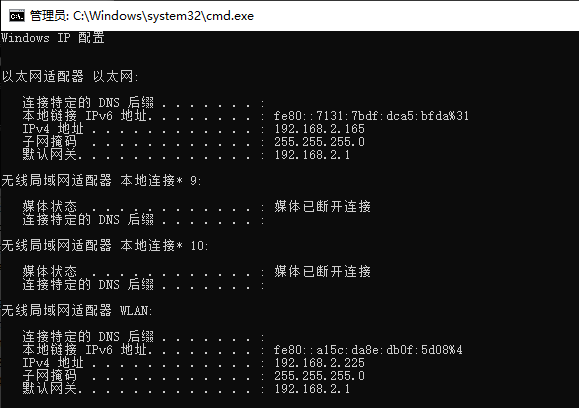
shown in the figure below:
1. To check your network gateway address using a dynamic IP connection on your computer: press the WIN+R key, type "cmd" to open the DOS command prompt, then type "ipconfig" to display your gateway address;
2. simply enter this gateway address as shown in the figure below:
Press and hold the RST button on the router until the SYS light starts flashing rapidly to reset the router's settings; after doing so, connect to the router using the default gateway address to access its admin interface.
3. Replace the network cable and retest.
4. If none of the above solutions work, contact the relevant personnel for inspection and repair;