







How to use Router with Wireless Dual-peater Mode (WDS)?
How to use Router with Wireless Dual-peater Mode (WDS)?
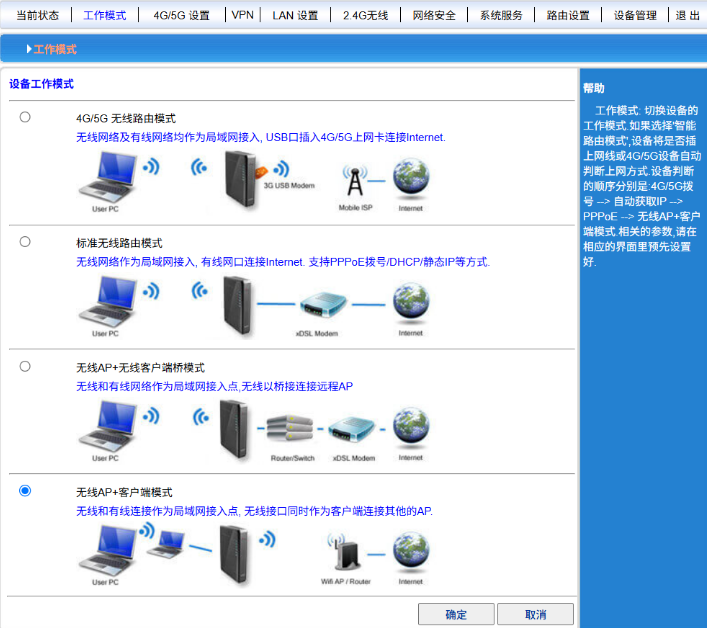
Access the router's admin interface, click "Operating Mode," and select "Wireless AP + Wireless Client Bridge Mode" or "Wireless Client Mode."
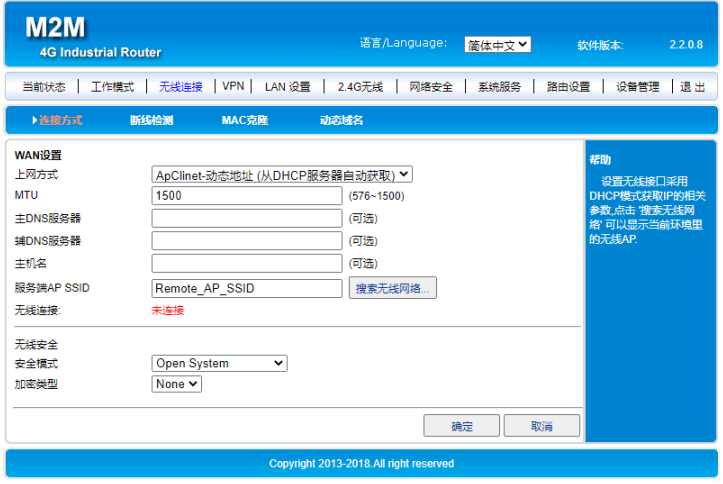
Wireless AP + Client Mode – It is recommended to use the Wireless AP + Client Mode. The Wireless AP + Wireless Client Bridge Mode prevents the router from being managed; instead, IP addresses are assigned uniformly by the upper-layer router. After successfully switching the mode, click "Wireless Connection" and then select the WiFi network you wish to bridge. The configuration diagram is shown below: Wireless AP + Client Mode – It is recommended to use the Wireless AP + Client Mode. The Wireless AP + Wireless Client Bridge Mode prevents the router from being managed; instead, IP addresses are assigned uniformly by the upper-layer router. After successfully switching the mode, click "Wireless Connection" and then select the WiFi network you wish to bridge. The configuration diagram is shown below: